Controlled product demonstration

From order to delivered evidence.

This is a walkthrough of a representative Tropos Operations workflow using deliberately fictional demonstration records. It shows the intended chain of accountability; it is not a live customer job or operational release.

01

Order intake

A controlled demonstration order creates one accountable operational record.

02

Plan the work

The operating area, capture design and delivery intent are confirmed together.

03

Readiness

Weather, airspace, NOTAM and FRZ context are reviewed before release.

04

Field close-out

An Android Field record captures the post-flight facts, online or offline.

05

Evidence path

Survey media and application actuals follow distinct, traceable routes.

06

Crew & aircraft

Named people, aircraft and flight activity remain attributable to the work.

07

Evidence delivery

The survey package, flight record and acceptance route stay connected.

08

Billing

Accepted evidence informs a traceable billing record.

01 · Order intake

A request becomes an accountable work record.

Rather than starting with a disconnected email, the request is framed around the site, service, expected output and intended delivery window.

Tropos Operations™DEMONSTRATION DATA
Order recordOPS-2026-0148Draft → readiness review
Client
Cwm Berwyn Forestry Demonstration
Service
Establishment survey
Site
Dyfnant Forest — Site C
Requested delivery
19 September 2026
Scope confirmedPlanning initiatedHuman release required

02 · Plan the work

Define the place before defining the flight.

The survey geometry, flight-line design and mission intent are assembled in the Operations workspace, ready for human review.
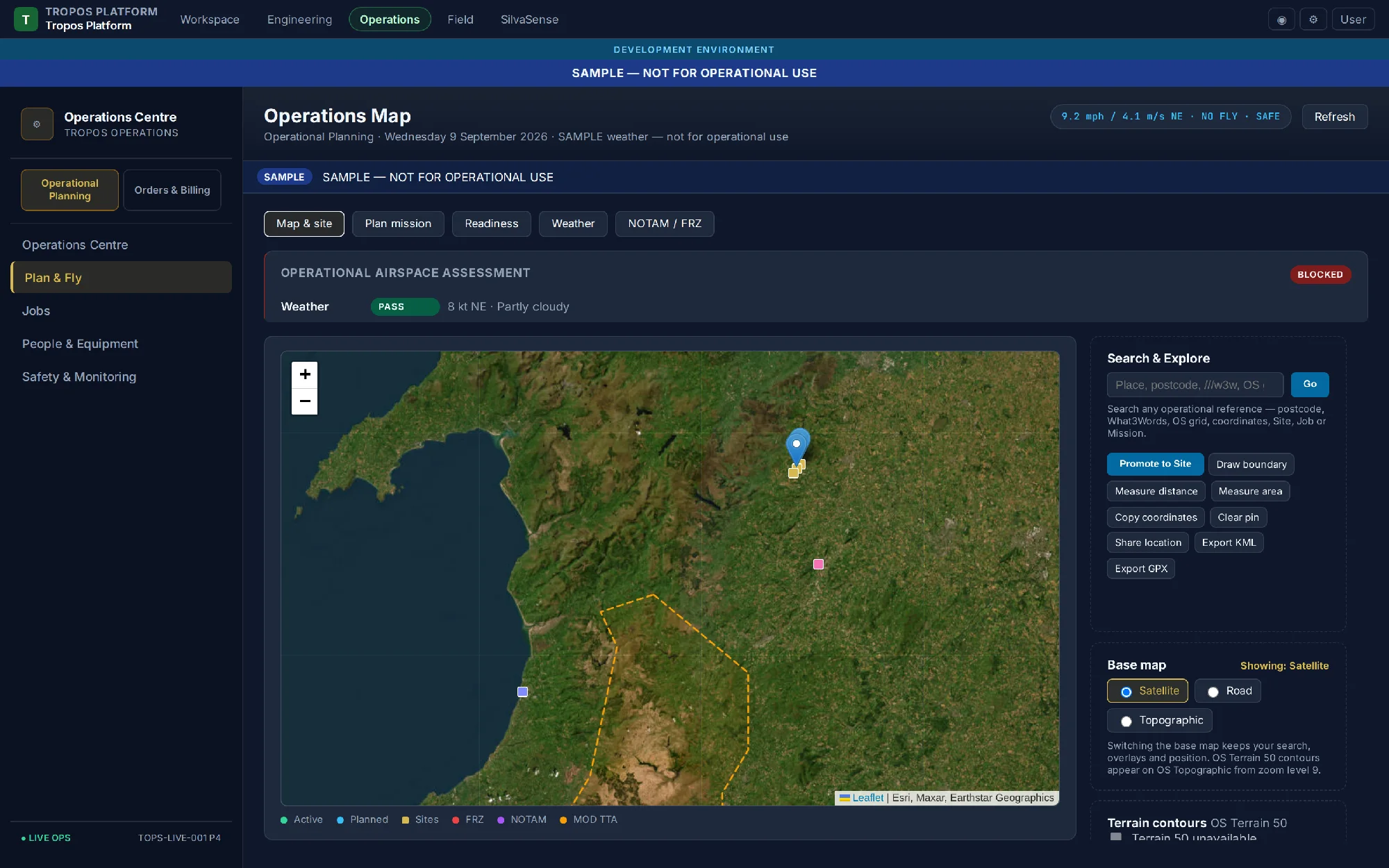
Tropos Operations planning workspace showing a mapped survey area and flight lines.
Operations planning workspace · representative product screen

03 · Readiness checks

Bring operational context into the decision.

Forecast, winds at operating heights, NOTAM and FRZ context are visible alongside the mission. A clear status informs review; it does not replace authority.
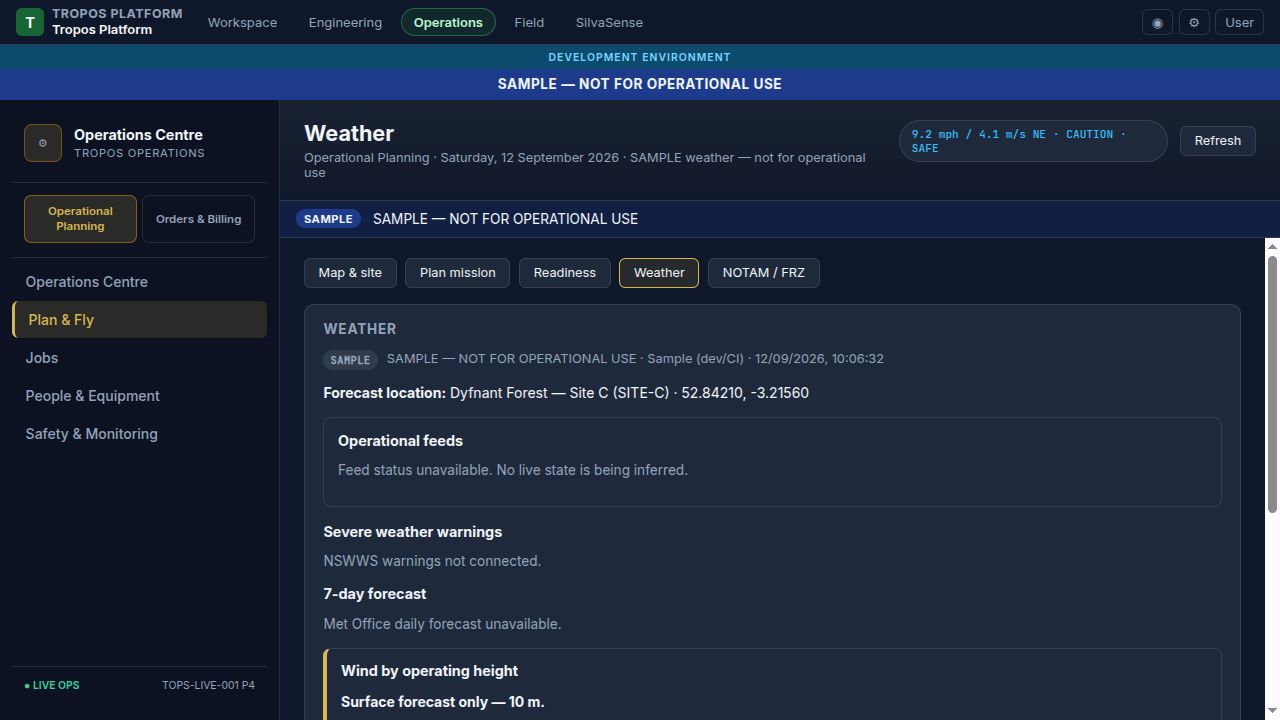
Tropos Operations weather screen showing forecast and wind information at different heights.
Weather · forecast and height-based wind context
Tropos Operations NOTAM and FRZ screen showing operational airspace information.
Airspace · NOTAM and FRZ context

04 · Field close-out

One Android Field flow for DJI and XAG crews.

At landing, Field brings together the human confirmation the manufacturer log does not contain: job, pilot, actual activity, checks, product actuals and any occurrence. It works offline and queues the record for Operations.

Tropos Field™ · End-of-flightOFFLINE QUEUE READY
Dyfnant Forest — Site CFlight close-out
Android phone · DJI RC Plus 2 or XAG ARC3 Pro alongside
✓ Pilot & aircraft confirmed✓ Take-off / landing recorded✓ Pre-flight inspection attached✓ Risk-assessment reference linked✓ Occurrences: none declared✓ Raw manufacturer log: sync pending
Saved locally at 12:06Synchronises to Operations when connected

05 · Evidence path

The aircraft log is shared. The evidence route is not.

Every sortie has one attributable flight record and technical-log link. Survey work preserves source media for processing; application work records what was actually applied. Neither route is treated as a substitute for the other.

Survey / inspectionTRANSFER VERIFIED
Capture bundleCB-OPS-0148
L3 / RGB source media
01Media receivedCFexpress card L3-014 · custodian confirmed
02Copy verified2,846 files · checksum manifest complete
03Upload resumedVehicle Starlink · transfer checkpoint saved
04Processing hand-offRaw source preserved · analysis intake ready
Survey evidence routeSource card retained until verified-copy procedure completes
Application / spreadingACTUALS RECORDED
Application recordAPP-OPS-0148
XAG P100 Pro · sample
01Material and lotUrea 46N · lot U46-0912 · 320 kg loaded
02Actual treatment4.8 ha · 62.5 kg/ha · 300 kg applied
03Return and deviation20 kg returned · no abort or coverage exception declared
04Evidence hand-offApplication actuals, Field close-out and manufacturer log linked
Application evidence routeCoverage is only claimed where the supporting record is present

06 · Crew & flight activity

Make the people and sorties visible.

Field-assisted, manual and manufacturer-imported records feed the same CAA-aligned review structure. Sensitive IDs are redacted in this demonstration.

Tropos Operations™ · People & EquipmentSAMPLE — NOT FOR OPERATIONAL USE
Flight logsDyfnant Forest — Site C
3 matched demonstration sorties
PilotAircraftTime & placeDurationStatus
Jack MorrisonDJI M400 RTK · ID redacted12 Sep · 08:20 · Dyfnant launch52 minField matched
Iurii PetrovDJI M400 RTK · ID redacted12 Sep · 09:35 · Dyfnant launch41 minManual review
Jack MorrisonXAG P100 Pro · ID redacted12 Sep · 11:10 · Dyfnant recovery36 minLog sync
Linked technical logInspection, risk and maintenance evidenceSeparate aircraft record, linked to every sortie
Manual fallbackSame fields, same audit trailFor flights completed without Tropos Field

07 · Evidence delivery

Deliver a package that can be inspected.

The delivery is connected to the original scope, planning context and recorded flight activity. Acceptance remains a human and customer-facing step.

Delivery package · demonstration

DEL-OPS-0148

Included evidence

  • Survey imagery and map layer
  • Mission plan and release context
  • Named pilot flight record
  • Client review and acceptance route
Prepared for client reviewDemonstration data — not a customer delivery

08 · Billing & close-out

Keep the commercial record connected to delivery.

Client acceptance creates a billing-ready record without separating commercial status from the evidence that supports it. Invoice issue and payment remain human-controlled.

Tropos Operations™ · Orders & BillingDEMONSTRATION DATA
Billing recordINV-OPS-0148READY FOR HUMAN REVIEW
Accepted delivery DEL-OPS-0148Service Establishment survey · Dyfnant Forest — Site CEvidence route Order → plan → Field → vehicle ingest → flight record → deliveryStatus Invoice prepared; payment not represented