Tropos Operations™
Menu
Inside OperationsWorkflowCapabilitiesAuthorityTropos Analytics ↗
Discuss your workflow ↗

Operational Planning · Orders & Billing

Plan the mission. Govern the order.

Start with the work on the ground: define the site and operating area, bring in forestry survey design from SilvaSense™ or agricultural capture and application requirements from AgriSense™, set the aircraft, payload and resources, and establish readiness. Keep that operational record connected to the requirement, quotation, evidence, acceptance and billing trail.

Tropos Operations flight-planning demonstration screenControlled demonstration
Development screen · controlled demonstration data · not a customer operation

One product · two strong entry points

For operators and organisations managing operators.

Operations™ can stand alone as a focused work-management product or connect with Tropos Field™ and the wider platform when evidence needs to travel further.

Drone contractors

Run the work without losing the record.

Bring enquiries, pricing, personnel, aircraft, readiness, mission documentation, delivery and the commercial trail into one accountable journey.

  • Independent operators
  • Multi-crew organisations
  • Specialist contractors
  • Survey and application work

Commissioning organisations

See what your contractors are responsible for.

Structure requirements, sites, suppliers, evidence expectations and acceptance without taking over the operator’s regulated authority.

  • Land managers
  • Utilities and infrastructure
  • Forestry organisations
  • Agricultural businesses

Inside the work

Plan on the map before the crew leaves.

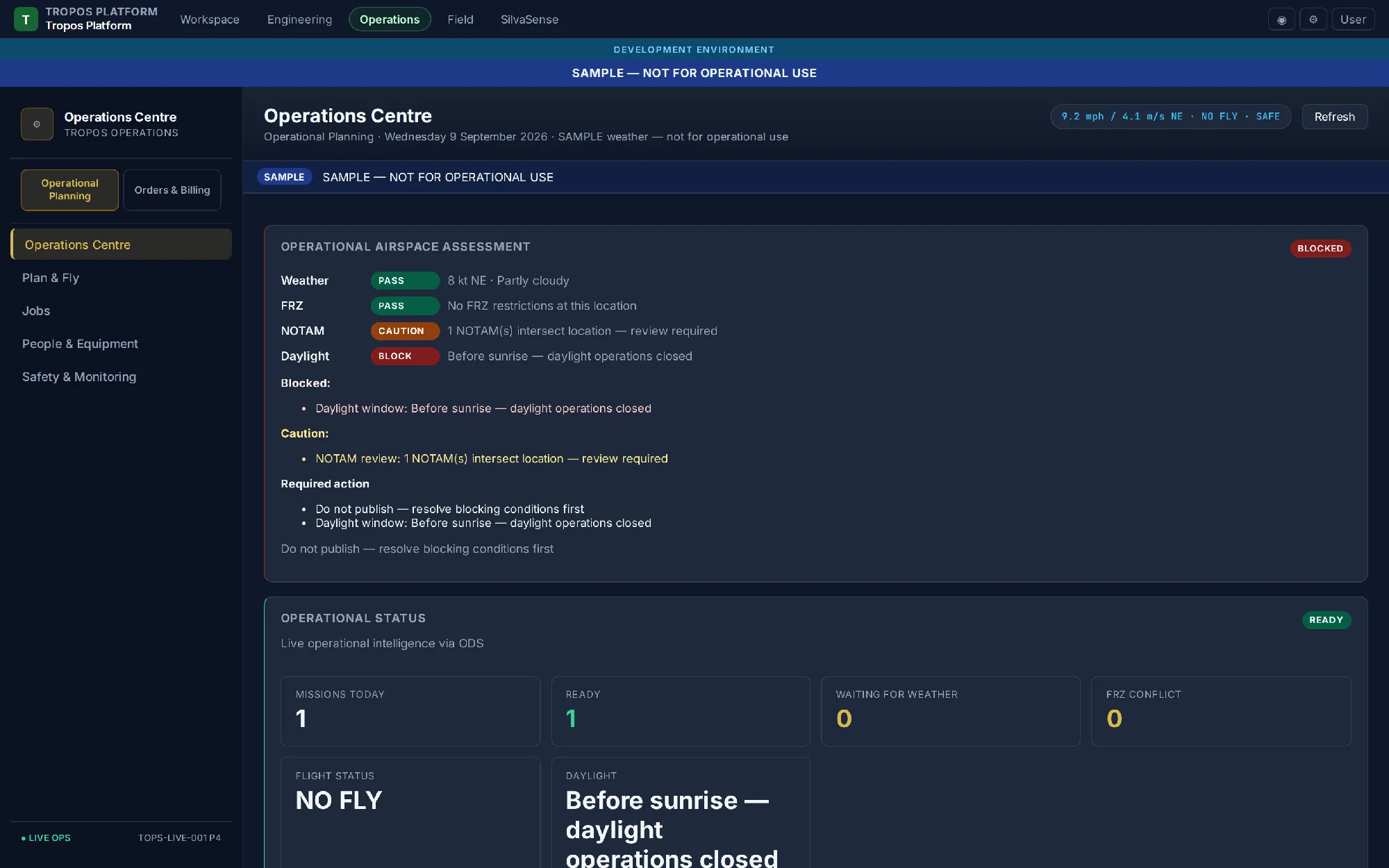
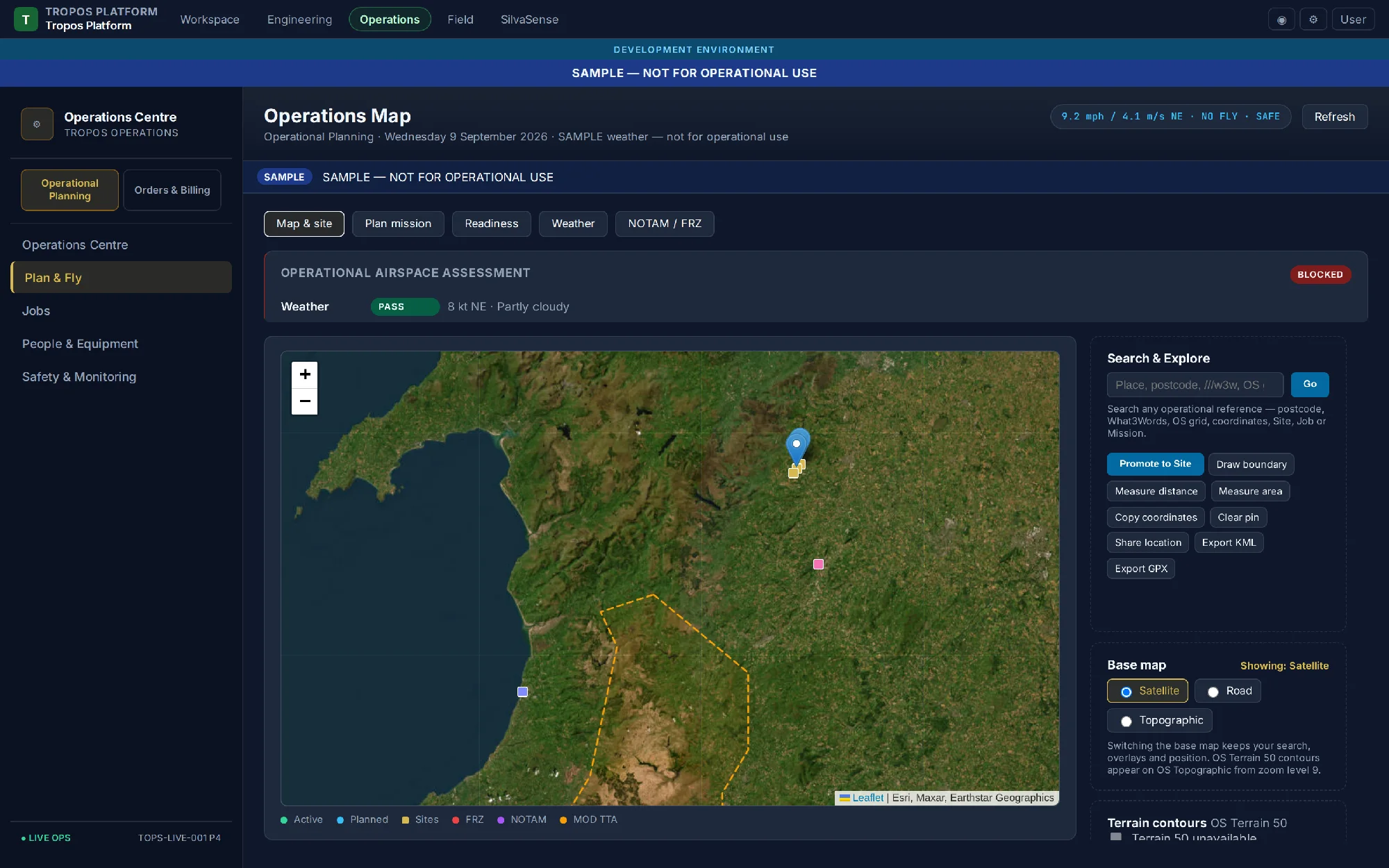
This is the real Operations™ development interface: a map-led view of sites and operating areas, backed by a readiness centre that makes blocks and cautions visible.

Tropos Operations development interface showing a flight-planning map, sites and an operating area
Map & siteSearch, inspect the operating area and keep current context alongside the plan.
Tropos Operations development interface showing operational readiness blocks and cautions
Operations CentreWeather, FRZ, NOTAM and daylight evidence shown before release.

Both screens use demonstration data and remain clearly marked as development samples. They show the direction of the working platform; they are not evidence of a completed customer operation.

Inside operational context

Weather and airspace, shown in the working product.

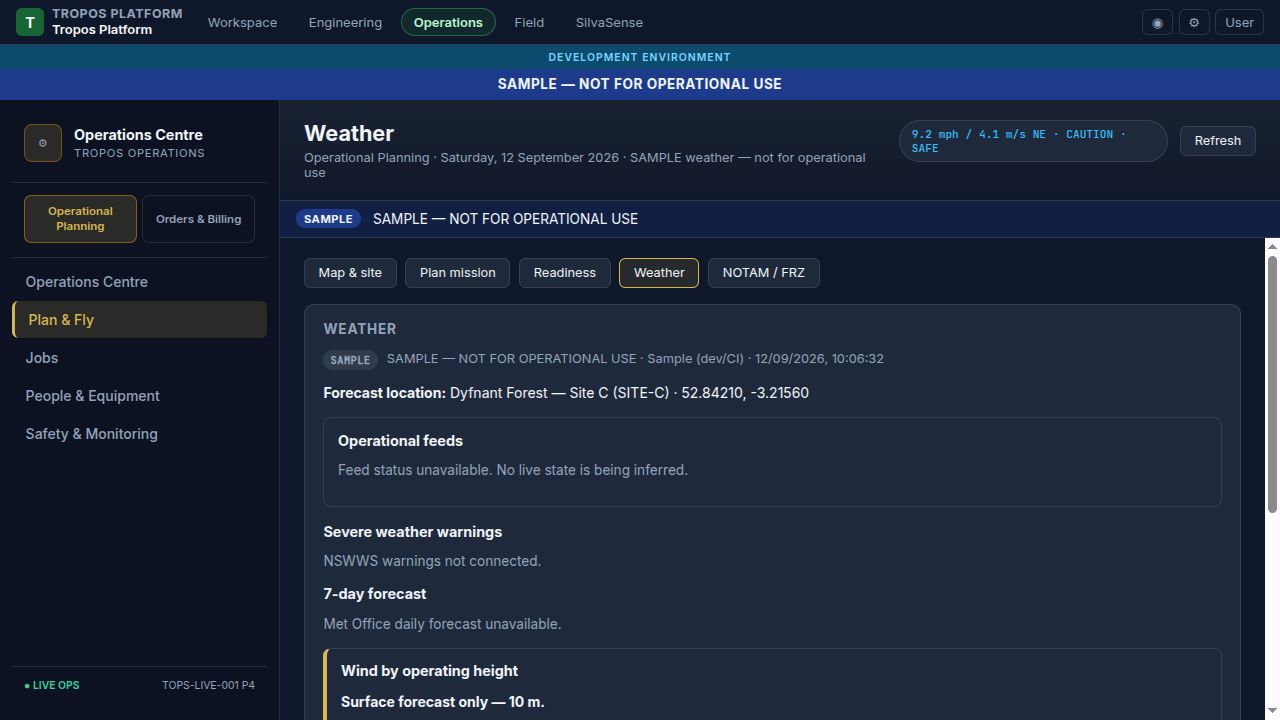
These development screenshots show the Operations™ planning views used to make weather, NOTAM and flight-restriction context visible before a named person makes a release decision.

Tropos Operations Weather screen showing forecast location, weather warnings, seven-day forecast and wind by operating height
WeatherForecast, warnings and wind-by-operating-height context are shown with source and development-state labels.
Tropos Operations NOTAM and flight restriction zone screen showing airspace awareness and official briefing guidance
NOTAM & FRZAirspace context, relevant restrictions and the official briefing path are presented for review; they do not authorise a flight.

The operational planning journey

From flight plan to governed field release.

The planning record carries the mission intent forward: geometry and settings, assigned resources, operational assessment, briefing material and the evidence behind a named human decision.

01DefineSite, AOI and mission purpose
02DesignFlight lines, route and geometry
03ConfigureAircraft, payload and parameters
04ResourcePilot, crew, vehicle and equipment
05AssessConditions, hazards and controls
06PackVersioned brief and field assignment
07ReleaseExplicit human authority

Operational and commercial control

More than a digital flight log.

Operations™ is being shaped around the complete business and accountability context surrounding drone work, with clear ownership and deliberate human gates.

01

Specialist plans, one operational route

Receive forestry survey geometry and flight lines from SilvaSense™ or agricultural capture, prescription, spot-treatment and broadcasting requirements from AgriSense™. Product plans inform Operations™; they do not grant operational authority.

02

Aircraft, payload and resources

Match pilot, crew, aircraft, vehicle, sensing or application payload and equipment to the mission; retain currency, competence, maintenance, defects, batteries and applicability records.

03

Assessment and readiness

Bring permissions, preliminary risk, operational conditions, hazards, controls, checklists and pilot verification into an explainable readiness record.

04

MissionPack and Field™ handoff

Operations™ turns the specialist requirement into the authoritative, versioned mission brief with objectives, boundary, access, welfare, capture or application requirements, assignments and the evidence Field™ needs to execute.

05

Orders, costing and quotations

Preserve the requirement, solution criteria, scope, resources, pricing assumptions, revisions, acceptance and links from the commercial order to operational jobs.

06

Evidence, acceptance and billing

Link capture and deliverable evidence to customer acceptance and a governed BillingPack, ready for controlled accounting integration and reconciliation as those connections mature.

Operational context from planning to Field™

The conditions do not stop changing when the crew leaves the office.

Operations™ is being developed to assemble time-stamped weather, NOTAM, FRZ, airspace and site information with its source, retrieval time, validity and limitations visible. The relevant Operational Context is referenced by the MissionPack and made available to Tropos Field™, where the crew can review the latest available information when connected or the last synchronised snapshot when offline.

Changes can trigger an updated context and Field™ warning. Expired or unavailable information is not silently treated as current: it is marked stale, and any acknowledgement or on-site amendment becomes part of the audit trail.

At the site, the Pilot in Command reviews the preliminary assessment, verifies actual conditions, records pass, fail, updated or not-applicable findings, and personally grants or refuses Flight Authorisation. The system records that decision; it does not make it. A further post-flight sign-off completes the operational record.

Compliance support, not compliance by declaration

Software can organise evidence. People retain responsibility.

Tropos Operations™ can help an organisation maintain records, expose gaps, follow its operating procedures and demonstrate how a decision was reached. Compliance still depends on the operator, people, permissions, procedures and conduct of the real operation.

Useful alone · stronger together

Begin with Operations™ or connect a specialist land workflow.

A contractor may use Operations™ independently. Connected to the wider Tropos platform, SilvaSense™ or AgriSense™ can supply the domain-specific requirement; Operations™ can govern planning and release; Field™ can carry the MissionPack and capture execution evidence; and governed Intelligence™ can support analysis without uncontrolled duplication.

Start with the workflow you have

Show us where the operational record breaks.

We welcome discussions with contractors and commissioning organisations about focused workflow mapping and carefully governed product development.

Discuss Tropos Operations™ ↗